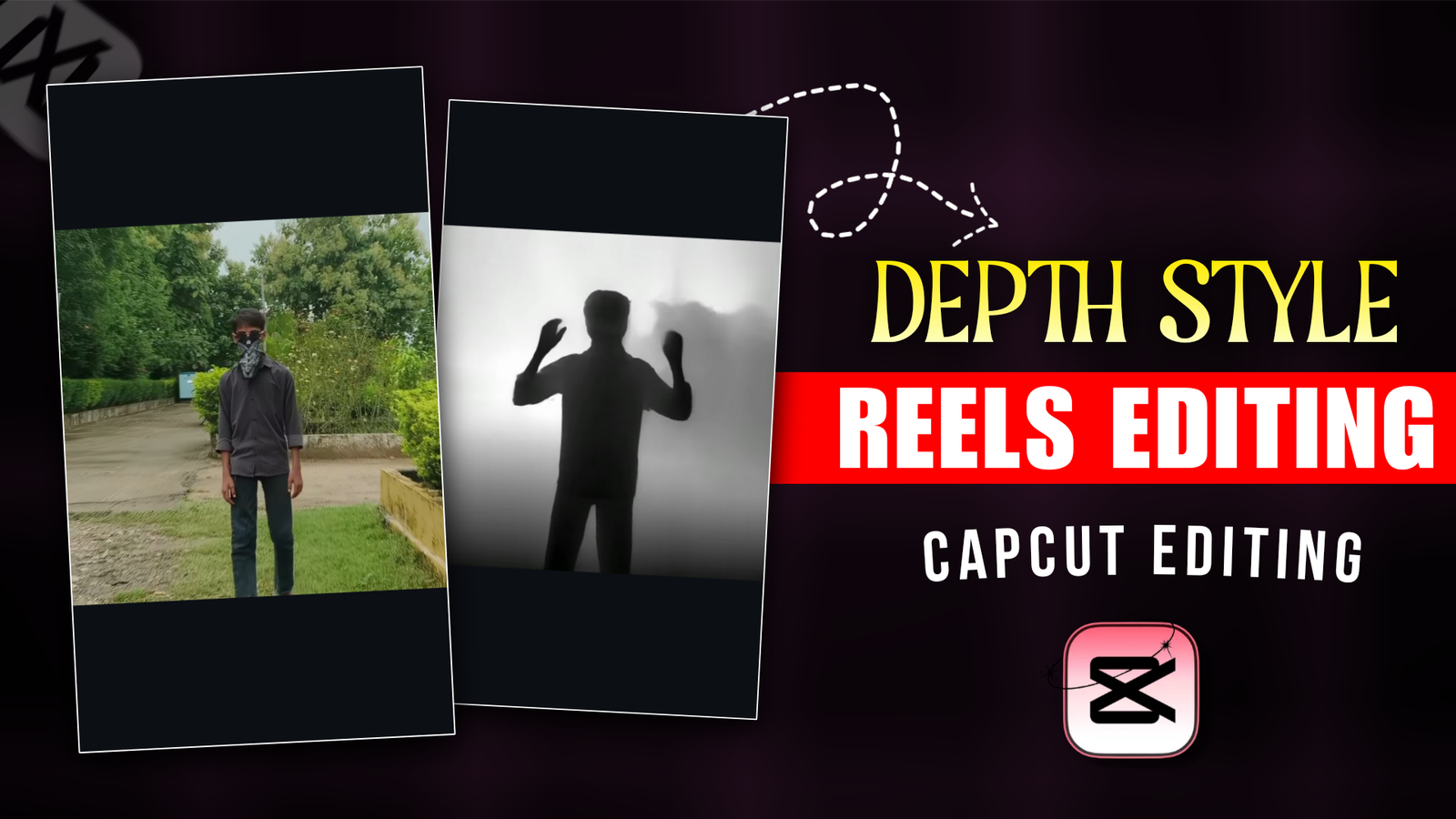
Depth Style Reels Editing Using Capcut-If you are active on regular Instagram and watch reels, you will see that Depth Style reels videos are going viral. And everyone is saying that such videos are not possible without premium pro. This is completely wrong, you can make high quality depth style reels with the capcut app on your mobile. After watching this depth style video, you will say that editing this video is very difficult and will take hours. If you follow the right method. You will be able to edit depth style videos in 10 minutes instead of 1-2 hours. There are many social media platforms where you can make your videos viral by posting them. I am telling you some social media names where such short videos go viral very quickly. First is Instagram, this platform where all kinds of videos are posted. If your video has some unique editing style and high quality in the video. Then the video has a higher chance of going viral. And if you upload it on Facebook, YouTube shorts. It will take less time for the video to go viral. You need to know some tips to make this depth style video better. For that, you’ll need to see my article.
Depth Style Reels Editing Using Capcut
‘Depth Style’ reels are crafted to be instantly appealing. The feature elements like black-and-white filters and zoom-in/zoom-out effects, resulting in a professional look. The quality and effects make them appear as though they were created using ‘ Premium Pro’ tools or PC-based video editing software. It is not that it will take 10 minutes to create a video. It may take more or less. Depending on how long our video is. If our video length is short. It will be edited within 10-20 seconds or within 10 minutes. And if you make a 40-50 second video, it may take 20-30 minutes. And if you want your video to be ready in 1 minute and you cannot give more time. There is a way for that too. In this post, I will tell you with the help of paragraphs. How you will edit with the capcut video editing app and create a depth style video. Also, I will tell you a tip with which it is possible to make a depth style video in 1 minute. To know all this, you have to read the paragraphs I have given.
What Need To Create Depth Style Reels?
What do we need to make a Depth Style video? To know this, I will show you through 1,2,3 steps.
CAPCUT App:- First of all, we will need an editing app for editing, since we are editing with our mobile, we will use the capcut video editing app. It will be difficult to make such a depth style video with any other mobile app. You will download the capcut apk from the play store.
VIDEO CLIP:- We will have to shoot 6,7 small video clips, shoot 6,7 videos for 5 seconds each. Keep your camera angel right while shooting the video. Give some stylish, attitude poses, keep the video ratio 9:16 if you want to make a short video.
EDITING SKILL:- We downloaded the app and prepared the video clip but we do not have the editing skills to edit the video. I will tell you two tips, one is that you will edit the video manually. As a result your editing skills will improve. And if you want to make a video in a short time, use Capcut Template. As a result your editing skills will not be required and it will not take much time. There are many people who like to make videos with templates. For them I am giving the link of the template below, they can use it from there.
Learn How To Edit Depth Style Reels Using Capcut ?
Now if you want to improve your editing skills, you need to understand these steps well, if you miss a single step, you will not be able to make the video perfectly. Now open the Capcut app and add the video clips. Duplicate all the video clips and add them to the overlay and remove the background. Now click on the main Layer and click on the Adjust Option and turn the brightness to full. Then open the graphs option and move the What Color from bottom to top, as a result the background will become white. Now click on the overlay video clip and make the Brightness and Saturation completely zero. After this, you have to move the graphs from the bottom to the top. When this is complete, you will see that the background is white and the model has become black. Now add the zoom in effect to the overlay video below. If you want to make the video look a little more beautiful, you can add the Smoke effect to the video. In this way, we have to make a video in Depth Style with the Capcut app.

Esay Way To Create Depth Style Reels Using Capcut Template?
This step is for those who like to make videos with templates. You will see a template link above, click on that link and open the template Capcut template. When you click, a page will open on Google e where it will be written about the template, there is a red bottom where it is written use capcut template, click there and open the depth style template in the capcut app. Now if you want, you can play the video and see how the video is. There is a use template bottom there, you have to click there and add the video clips from the gallery, you may have to add 6,7 video clips or more. After that, click on the next button, then the effects will be added to the video and the video will be created. To export, click on the export bottom at the top.
Overall
Today’s article helped you a lot. You got the knowledge of editing skills along with the template from this post. Which will help you a lot to edit any video later. Since such depth style videos are going viral. If someone wants to edit such style, you can edit reels in such style and you can also get money with it. I hope if you edit and post this video, your video will get good views. To get such trending Editing Tutorials and Ai Photo Prompt, you must visit my website, thank you.
Asif
Sabzar
𝘛𝘩𝘪𝘴 𝘴𝘵𝘦𝘱 𝘪𝘴 𝘧𝘰𝘳 𝘵𝘩𝘰𝘴𝘦 𝘸𝘩𝘰 𝘭𝘪𝘬𝘦 𝘵𝘰 𝘮𝘢𝘬𝘦 𝘷𝘪𝘥𝘦𝘰𝘴 𝘸𝘪𝘵𝘩 𝘵𝘦𝘮𝘱𝘭𝘢𝘵𝘦𝘴. 𝘠𝘰𝘶 𝘸𝘪𝘭𝘭 𝘴𝘦𝘦 𝘢 𝘵𝘦𝘮𝘱𝘭𝘢𝘵𝘦 𝘭𝘪𝘯𝘬 𝘢𝘣𝘰𝘷𝘦, 𝘤𝘭𝘪𝘤𝘬 𝘰𝘯 𝘵𝘩𝘢𝘵 𝘭𝘪𝘯𝘬 𝘢𝘯𝘥 𝘰𝘱𝘦𝘯 𝘵𝘩𝘦 𝘵𝘦𝘮𝘱𝘭𝘢𝘵𝘦 𝘊𝘢𝘱𝘤𝘶𝘵 𝘵𝘦𝘮𝘱𝘭𝘢𝘵𝘦. 𝘞𝘩𝘦𝘯 𝘺𝘰𝘶 𝘤𝘭𝘪𝘤𝘬, 𝘢 𝘱𝘢𝘨𝘦 𝘸𝘪𝘭𝘭 𝘰𝘱𝘦𝘯 𝘰𝘯 𝘎𝘰𝘰𝘨𝘭𝘦 𝘦 𝘸𝘩𝘦𝘳𝘦 𝘪𝘵 𝘸𝘪𝘭𝘭 𝘣𝘦 𝘸𝘳𝘪𝘵𝘵𝘦𝘯 𝘢𝘣𝘰𝘶𝘵 𝘵𝘩𝘦 𝘵𝘦𝘮𝘱𝘭𝘢𝘵𝘦, 𝘵𝘩𝘦𝘳𝘦 𝘪𝘴 𝘢 𝘳𝘦𝘥 𝘣𝘰𝘵𝘵𝘰𝘮 𝘸𝘩𝘦𝘳𝘦 𝘪𝘵 𝘪𝘴 𝘸𝘳𝘪𝘵𝘵𝘦𝘯 𝘶𝘴𝘦 𝘤𝘢𝘱𝘤𝘶𝘵 𝘵𝘦𝘮𝘱𝘭𝘢𝘵𝘦, 𝘤𝘭𝘪𝘤𝘬 𝘵𝘩𝘦𝘳𝘦 𝘢𝘯𝘥 𝘰𝘱𝘦𝘯 𝘵𝘩𝘦 𝘥𝘦𝘱𝘵𝘩 𝘴𝘵𝘺𝘭𝘦 𝘵𝘦𝘮𝘱𝘭𝘢𝘵𝘦 𝘪𝘯 𝘵𝘩𝘦 𝘤𝘢𝘱𝘤𝘶𝘵 𝘢𝘱𝘱. 𝘕𝘰𝘸 𝘪𝘧 𝘺𝘰𝘶 𝘸𝘢𝘯𝘵, 𝘺𝘰𝘶 𝘤𝘢𝘯 𝘱𝘭𝘢𝘺 𝘵𝘩𝘦 𝘷𝘪𝘥𝘦𝘰 𝘢𝘯𝘥 𝘴𝘦𝘦 𝘩𝘰𝘸 𝘵𝘩𝘦 𝘷𝘪𝘥𝘦𝘰 𝘪𝘴. 𝘛𝘩𝘦𝘳𝘦 𝘪𝘴 𝘢 𝘶𝘴𝘦 𝘵𝘦𝘮𝘱𝘭𝘢𝘵𝘦 𝘣𝘰𝘵𝘵𝘰𝘮 𝘵𝘩𝘦𝘳𝘦, 𝘺𝘰𝘶 𝘩𝘢𝘷𝘦 𝘵𝘰 𝘤𝘭𝘪𝘤𝘬 𝘵𝘩𝘦𝘳𝘦 𝘢𝘯𝘥 𝘢𝘥𝘥 𝘵𝘩𝘦 𝘷𝘪𝘥𝘦𝘰 𝘤𝘭𝘪𝘱𝘴 𝘧𝘳𝘰𝘮 𝘵𝘩𝘦 𝘨𝘢𝘭𝘭𝘦𝘳𝘺, 𝘺𝘰𝘶 𝘮𝘢𝘺 𝘩𝘢𝘷𝘦 𝘵𝘰 𝘢𝘥𝘥 6,7 𝘷𝘪𝘥𝘦𝘰 𝘤𝘭𝘪𝘱𝘴 𝘰𝘳 𝘮𝘰𝘳𝘦. 𝘈𝘧𝘵𝘦𝘳 𝘵𝘩𝘢𝘵, 𝘤𝘭𝘪𝘤𝘬 𝘰𝘯 𝘵𝘩𝘦 𝘯𝘦𝘹𝘵 𝘣𝘶𝘵𝘵𝘰𝘯, 𝘵𝘩𝘦𝘯 𝘵𝘩𝘦 𝘦𝘧𝘧𝘦𝘤𝘵𝘴 𝘸𝘪𝘭𝘭 𝘣𝘦 𝘢𝘥𝘥𝘦𝘥 𝘵𝘰 𝘵𝘩𝘦 𝘷𝘪𝘥𝘦𝘰 𝘢𝘯𝘥 𝘵𝘩𝘦 𝘷𝘪𝘥𝘦𝘰 𝘸𝘪𝘭𝘭 𝘣𝘦 𝘤𝘳𝘦𝘢𝘵𝘦𝘥. 𝘛𝘰 𝘦𝘹𝘱𝘰𝘳𝘵, 𝘤𝘭𝘪𝘤𝘬 𝘰𝘯 𝘵𝘩𝘦 𝘦𝘹𝘱𝘰𝘳𝘵 𝘣𝘰𝘵𝘵𝘰𝘮 𝘢𝘵 𝘵𝘩𝘦 𝘵𝘰𝘱
Rohit
Love you
Ryh
Virat
Very nice
Gbycbyxbucntbjtbj
Fhfebeeuev
Nsgwvwhwhwj
Wgwgbw
1234567890