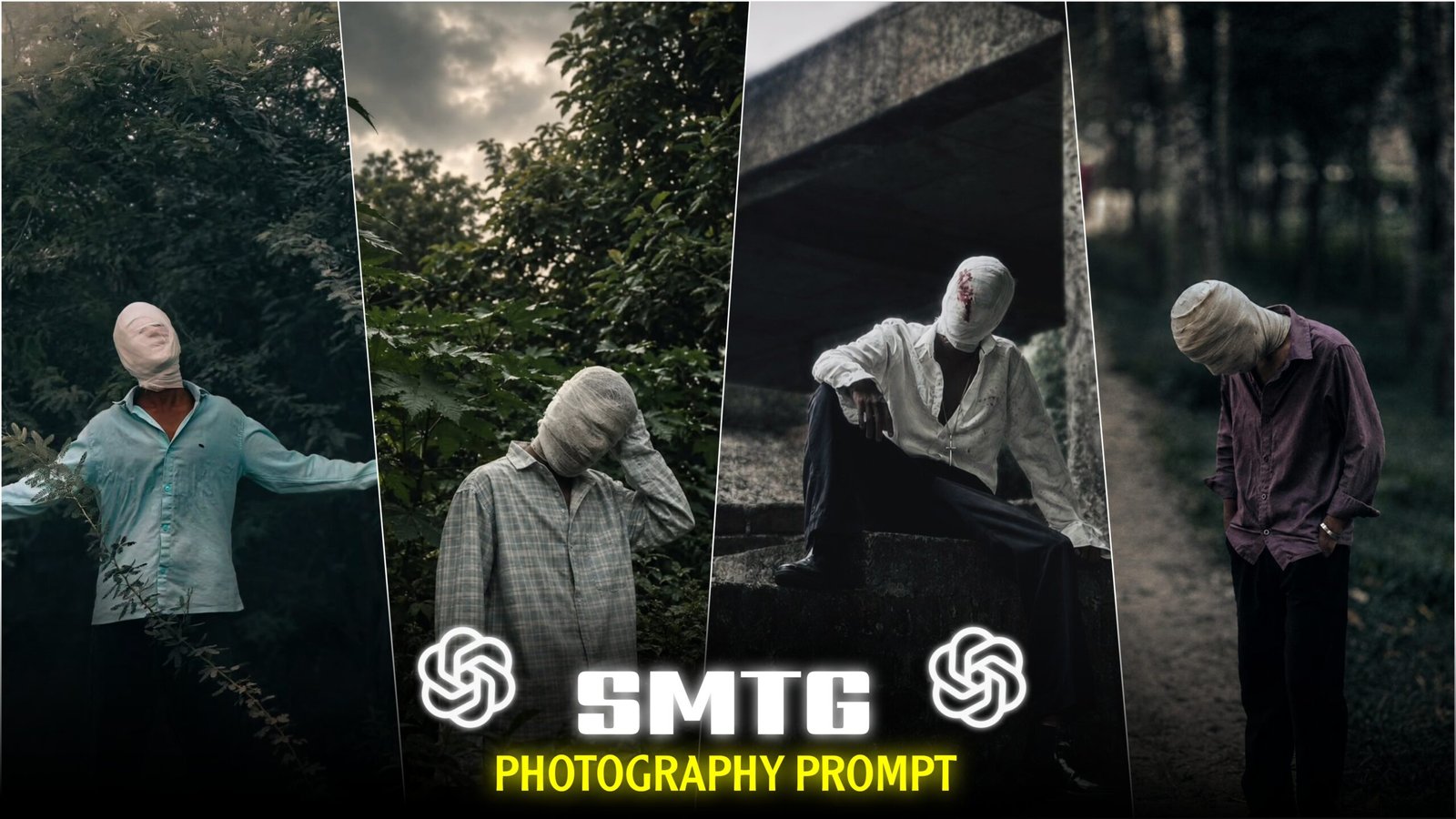
Cinematic Bandaged face photo editing-You are likely aware of the growing importance of AI-powered photo editing in today’s market. In the past, people relied on manual editing apps, which often presented various challenges; the process was time-consuming, and achieving the desired result was difficult. For an inexperienced editor, mastering the various tools required for manual editing was a daunting task. However, the advent of AI has resolved most of these issues. Tasks that once took hours can now be accomplished effortlessly using AI. AI-generated or AI-edited photos are currently going viral across platforms like Instagram, Facebook, WhatsApp, and YouTube. People are not only creating and posting these images but also using them to make videos for Instagram Reels, Facebook Reels, and YouTube Shorts. You have likely seen these AI-edited photos on social media; they look impressive, and AI ensures a high level of precision in the editing process. AI-edited photos—particularly those featuring specific styles—are trending widely, especially on Instagram. One of the most viral trends is “Cinematic Bandaged Face” photo editing. People are now creating these images by combining their own photoshoots (in various poses) with AI technology.
In this article, I will teach you exactly how to transform a standard photo into this style of edited image using AI. If you want to learn this photo editing technique, be sure to read today’s article very carefully from start to finish; doing so will make it easy for you to master the process. So, let’s get started with today’s article.
What is this “Cinematic Bandaged Face” photo editing trend?
Friends, this “Cinematic Bandaged Face” photo editing style is currently a viral trend on Instagram that almost everyone is trying out. These photos look incredibly cinematic because they incorporate various cinematic effects, such as dark backgrounds and moody lighting. They possess a unique, creative, and highly aesthetic appeal. If you were to shoot these photos manually, you would need several props and a high-quality camera. However, by using AI, you can create these images easily—in just a single click and very little time. The typical look involves a model wrapping a standard bandage around their head and face (extending down to the neck), with red cross-like marks drawn near the eyes and on the mouth. Initially, the photo is shot in various poses, followed by a lengthy manual editing process using different apps before finally being posted on social media. Alternatively, if you use AI, you simply need to provide a standard photo and a detailed prompt, and the AI will generate an edit that looks exactly like this style. This trend is currently very popular, especially among Generation Z.
What do you need For Cinematic Bandaged Face Photo editing?
Friends, you don’t need a lot of things for this kind of photo editing; just a few essentials will allow you to do it easily. Here is a list of what you need:
1. A photo of yourself –
Obviously, you need a photo to start with. However, the *type* of photo matters. When shooting, you don’t need to physically wrap bandages around your head or face; AI can handle that part. But you should strike aesthetic poses during the photoshoot so that the final edited images look amazing. Try to go for unique poses.
2. An AI prompt –
Once the photoshoot is done, it’s time to edit. You will need a detailed prompt for this. You can write your own prompt for this “cinematic bandaged face” style if you wish. Alternatively, if you prefer not to write one, I have provided an example image below along with the specific prompt used for it; feel free to use that. I achieved excellent results using this prompt myself, and I hope you will too.
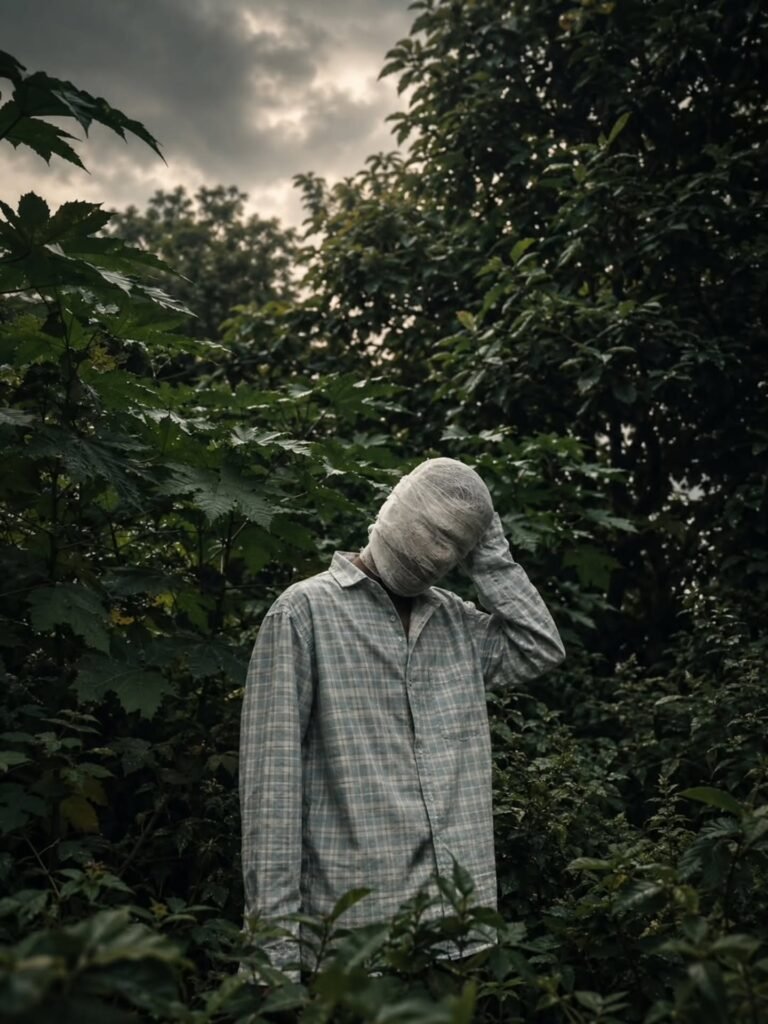
THE PROMPT 👇
Create an ultra-realistic cinematic portrait
 using the uploaded photo as the exact
 reference. Preserve body proportions, pose,
 posture, hands, arms, clothing, accessories,
camera angle, composition and framing unchanged.
 Completely wrap the entire head and face
 in thick, opaque off-white cotton bandages
 with overlapping layers. Fully cover hair,
 forehead, eyes, eyebrows, nose, cheeks, mouth,
 jawline, chin and ears. No facial features,
 skin, gaps, openings or recognizable face
shape should be visible. Keep the original
background unchanged. Apply a dark moody
cinematic color grade in the photo, deep shadows,
 subtle warm highlights, atmospheric haze,
 natural HDR, contrast and film grain.
3. A photo generator app –
To create these edits using AI, you will need an AI photo editing app. The two apps I use most frequently for this purpose are:
1. ChatGPT AI
2. Google Gemini AI
It’s not just me—almost everyone uses these two apps for photo editing. They are incredibly popular among users. I hope you will use either of these two apps for this kind of photo editing; you should get excellent results.
That’s it, friends—if you have these three things, you can easily create these types of photo edits.
Why Are Cinematic Bandaged face Photos So Popular Right Now?
There are several reasons behind the popularity of these photos:
1. Cinematic Look
These photos incorporate various elements like color effects, specific color tones, and color grading, giving them a highly cinematic appearance. This is why people really enjoy viewing them.
2. Creative Look
The unique styles currently being used in these photos lend them a very creative look. Specifically, the way the head and face are completely wrapped in bandages creates a distinctively creative aesthetic.
3. Aesthetic Look
The style of these photos is highly aesthetic, creating a unique vibe. People who appreciate an aesthetic look are increasingly editing and sharing these types of photos.
How do you edit these photos?
First, before editing, you need to take photos of yourself in various unique or aesthetic poses. Once the photoshoot is done, open an AI app or website—such as ChatGPT or Google Gemini—on your phone. Mobile users should use the apps, while desktop users should use the websites; the process works the same way on both. Open either ChatGPT or Gemini; the editing process is nearly identical for both. If you are visiting these platforms for the first time, you will need to sign up using an email address. After signing up, look for the plus (+) icon and click on it, then select the gallery option. All the photos in your gallery will appear; choose the specific photo you want to edit. Next, copy the prompt I have provided on my website for this specific edit. Paste the prompt below the photo and click the “Send” or “Generate” button; your edited photo will be ready within a few seconds to a couple of minutes. By following these simple steps, you can easily edit your photos.
Overall –
In today’s article, I have explained how you can easily create cinematic “bandaged face” photos. This style of photo is currently going viral across various social media platforms like Instagram, Facebook, and TikTok. You can create these images from a standard photo using AI—achieving the result with just a single click in a matter of seconds. You don’t need anything special to create them; a simple photo is all that’s required, and you can easily handle the rest using your device. I hope I have clearly explained or demonstrated the editing process to you. If you find any part difficult to understand, please read the article again; I am confident you will grasp it easily. That’s all for today’s article—see you in the next one.
Jungle per banaa do
❤️❤️❤️
Nice
How to iPhone photo send me
Humko video banana hai Banakar do
Create an ultra-realistic cinematic portrait
using the uploaded photo as the exact
reference. Preserve body proportions, pose,
posture, hands, arms, clothing, accessories,
camera angle, composition and framing unchanged.
Completely wrap the entire head and face
in thick, opaque off-white cotton bandages
with overlapping layers. Fully cover hair,
forehead, eyes, eyebrows, nose, cheeks, mouth,
jawline, chin and ears. No facial features,
skin, gaps, openings or recognizable face
shape should be visible. Keep the original
background unchanged. Apply a dark moody
cinematic color grade in the photo, deep shadows,
subtle warm highlights, atmospheric haze,
natural HDR, contrast and film grain
Create an ultra-realistic cinematic portrait
using the uploaded photo as the exact
reference. Preserve body proportions, pose,
posture, hands, arms, clothing, accessories,
camera angle, composition and framing unchanged.
Completely wrap the entire head and face
in thick, opaque off-white cotton bandages
with overlapping layers. Fully cover hair,
forehead, eyes, eyebrows, nose, cheeks, mouth,
jawline, chin and ears. No facial features,
skin, gaps, openings or recognizable face
shape should be visible. Keep the original
background unchanged. Apply a dark moody
cinematic color grade in the photo, deep shadows,
subtle warm highlights, atmospheric haze,
natural HDR, contrast and film grain.
3. A photo generator app –
To create these edits using AI, you will need an AI photo editing app. The
🎧💖
Create an ultra-realistic cinematic portrait
using the uploaded photo as the exact
reference. Preserve body proportions, pose,
posture, hands, arms, clothing, accessories,
camera angle, composition and framing unchanged.
Completely wrap the entire head and face
in thick, opaque off-white cotton bandages
with overlapping layers. Fully cover hair,
forehead, eyes, eyebrows, nose, cheeks, mouth,
jawline, chin and ears. No facial features,
skin, gaps, openings or recognizable face
shape should be visible. Keep the original
background unchanged. Apply a dark moody
cinematic color grade in the photo, deep shadows,
subtle warm highlights, atmospheric haze,
natural HDR, contrast and
Create an ultra-realistic cinematic portrait
using the uploaded photo as the exact
reference. Preserve body proportions, pose,
posture, hands, arms, clothing, accessories,
camera angle, composition and framing unchanged.
Completely wrap the entire head and face
in thick, opaque off-white cotton bandages
with overlapping layers. Fully cover hair,
forehead, eyes, eyebrows, nose, cheeks, mouth,
jawline, chin and ears. No facial features,
skin, gaps, openings or recognizable face
shape should be visible. Keep the original
background unchanged. Apply a dark moody
cinematic color grade in the photo, deep shadows,
subtle warm highlights, atmospheric haze,
natural HDR, contrast and film grain
Hello 👋
Hello 👋
using the uploaded photo as the exact
reference. Preserve body proportions, pose,
posture, hands, arms, clothing, accessories,
camera angle, composition and framing unchanged.
Completely wrap the entire head and face
in thick, opaque off-white cotton bandages
with overlapping layers. Fully cover hair,
forehead, eyes, eyebrows, nose, cheeks, mouth,
jawline, chin and ears. No facial features,
skin, gaps, openings or recognizable face
shape should be visible. Keep the original
background unchanged. Apply a dark moody
cinematic color grade in the photo, deep shadows,
subtle warm highlights, atmospheric haze,
natural HDR, contrast and
Bandaged man black t ‘shirt
shhh pose green forest
cinematic ultra realistic DSLR
Love 😘😘 a
Edit
Create an ultra-realistic cinematic portrait
using the uploaded photo as the exact
reference. Preserve body proportions, pose,
posture, hands, arms, clothing, accessories,
camera angle, composition and framing unchanged.
Completely wrap the entire head and face
in thick, opaque off-white cotton bandages
with overlapping layers. Fully cover hair,
forehead, eyes, eyebrows, nose, cheeks, mouth,
jawline, chin and ears. No facial features,
skin, gaps, openings or recognizable face
shape should be visible. Keep the original
background unchanged. Apply a dark moody
cinematic color grade in the photo, deep shadows,
subtle warm highlights, atmospheric haze,
natural HDR, contrast and film grain
Amir1234
Nice bro
Please give me capcut pro
Mafiy
Susanta Majhi
Nice clips
PROMPT
Tug
Please me
Please me
Mere ko ek kar do na bhai please 🥺🥺