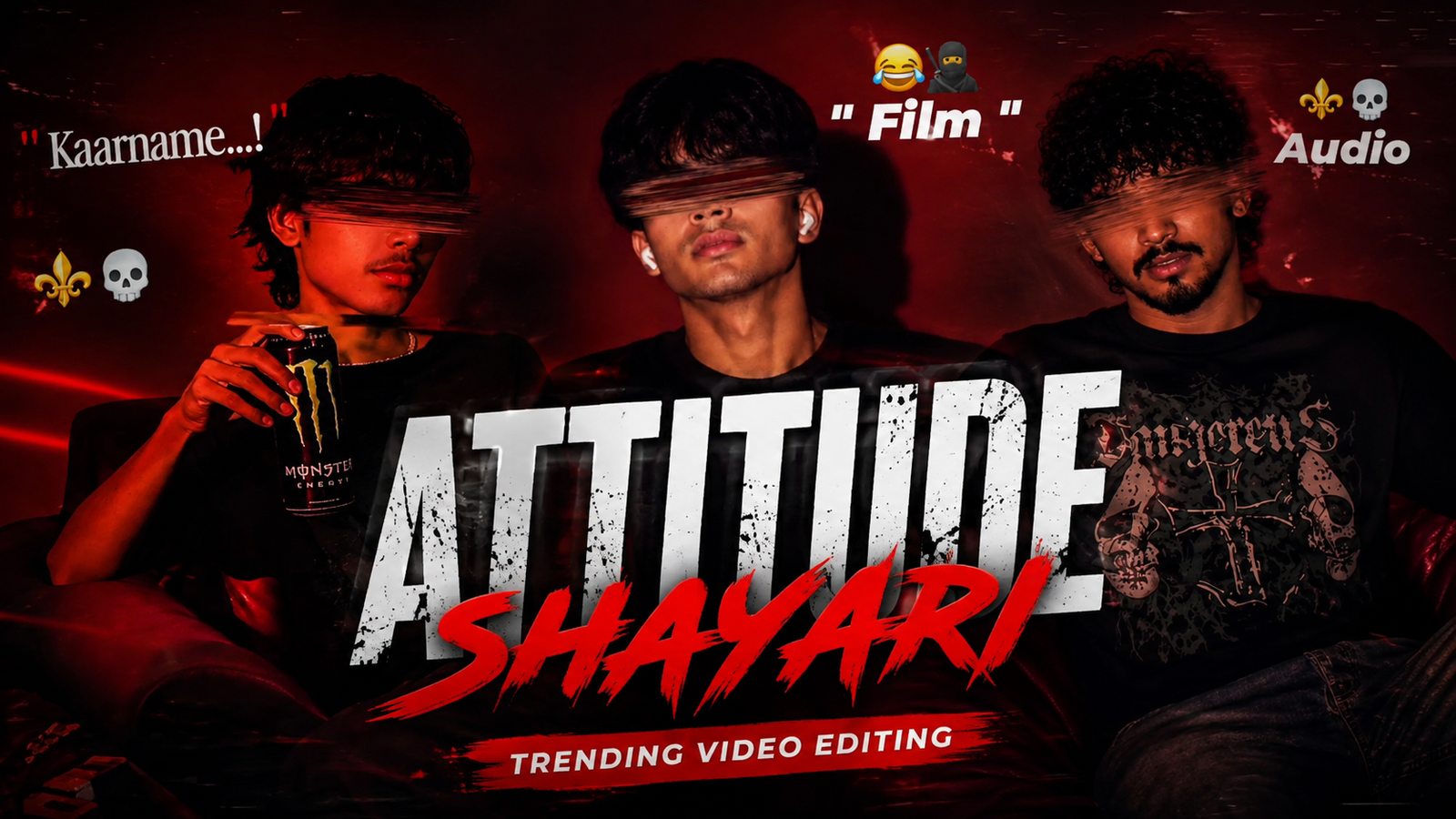
Trending attitude Shayari video editing-Hello friends, how are you all? I hope you are doing well. Lately, I’ve noticed something on Instagram: Trending attitude Shayari video editing. I’ve observed that anyone creating and uploading these types of videos as Reels sees them go viral, garnering a huge number of likes, comments, and shares. Since this editing style is currently trending, I’ve put together this article to teach you how to do it. I felt it was important for my audience to learn this technique. Various *shayari* videos are going viral across social media platforms like Instagram Reels, Facebook Reels, and YouTube Shorts. Among them, the most popular trend is “attitude *shayari*” video editing. I’ve seen this taught in various ways—using CapCut templates or VN codes—but in this article, I’ll show you how to create these videos manually and easily. Relying on templates or codes limits you to a specific style; you can’t really customize the video much. By learning the manual method, however, you can use any song, effect, color, or text to create a truly professional-looking video.
I’ll explain the process in such a way that you’ll find the manual method even easier than using templates. If you want to master this trending editing style, make sure to read this article carefully from start to finish without skipping anything. You’ll be able to learn this trending editing technique with ease. So, friends, let’s get started with today’s article.
What is this trending “attitude Shayari” video editing?
Friends, this “attitude Shayari” video editing style is currently trending on social media and has become extremely popular. These videos typically feature a person sitting on a black chair against a red background, with a red rim light outlining their figure. The subject sits in a confident, “attitude-filled” pose, and a blur effect applied to the eyes adds a creative touch to the entire video. Additionally, various colored light effects are used to give the video a professional finish. Creators use these videos across various platforms—such as WhatsApp and Facebook stories, Facebook Reels, and Instagram Reels—or simply to showcase their personality. The videos themselves possess a unique and creative aesthetic.
What do you need to create these types of videos?
Friends, I have listed below the things required to create these videos:
1. A photo of yourself –
To create these videos, you will need a photo of yourself. It can be a selfie or a photo taken with the rear camera. When taking the photo, make sure there is adequate lighting; avoid taking it in complete darkness. Also, ensure the photo isn’t blurry—a clear photo will yield much better results.
2. An AI prompt –
You don’t need to go out of your way to stage a photoshoot with a specific “attitude” pose. With the help of an AI prompt, you can generate such a photo in any AI app with just a single click. I will explain which app delivers the best results i will provided the prompt below; using it will guarantee excellent results. I have personally used this prompt to create similar photos and was very pleased with the outcome. This prompt is suitable for both men and women. You will find the prompt right below the example photo shown here.
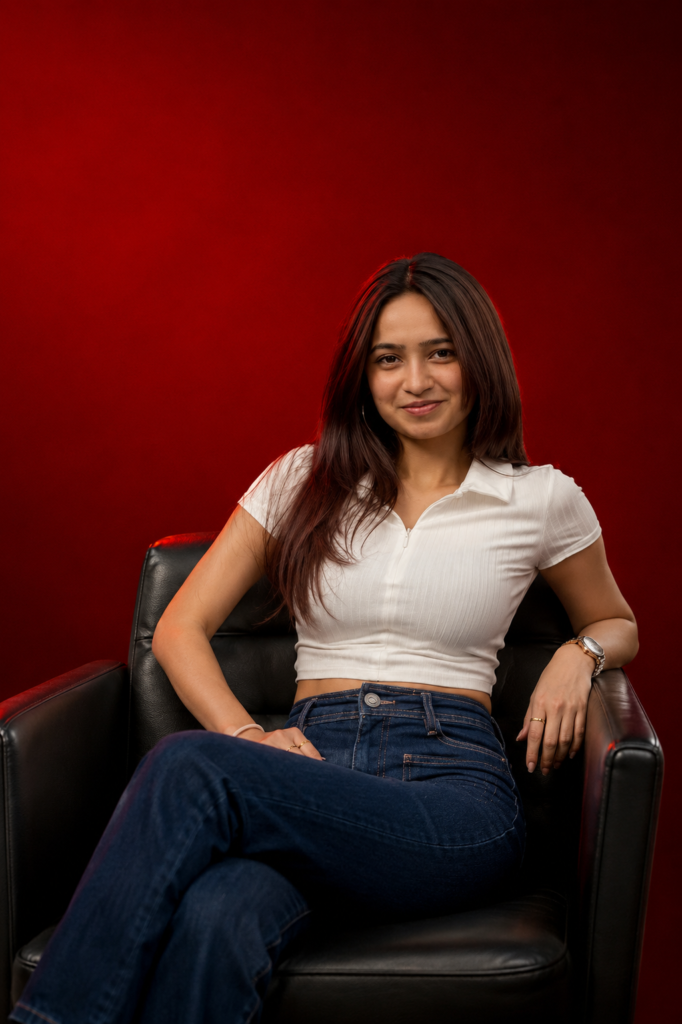
PROMPT 1 👇
Create a cinematic medium-full portrait of the
person seated confidently in a modern black leather
chair, captured from a slightly low angle. Preserve
 the subject’s exact original identity, face,
facial features, face shape, eyes, nose, lips,
jawline, skin tone, hairstyle, and natural facial
 details. Do not change, replace, beautify, feminize,
masculinize, or regenerate the face. Keep the
original outfit, clothing style, colors, fabric,
accessories, and every outfit detail exactly
unchanged. Apply a solid deep-red background,
dramatic directional studio lighting, subtle red rim
 light, rule-of-thirds composition, clean negative space,
85mm prime lens, shallow depth of field, sharp focus,
 rich blacks, deep reds, realistic textures, high contrast,
 ultra-detailed photorealistic fashion-editorial quality.
The prompt must work naturally for both male and female
 subjects without changing their original appearance.
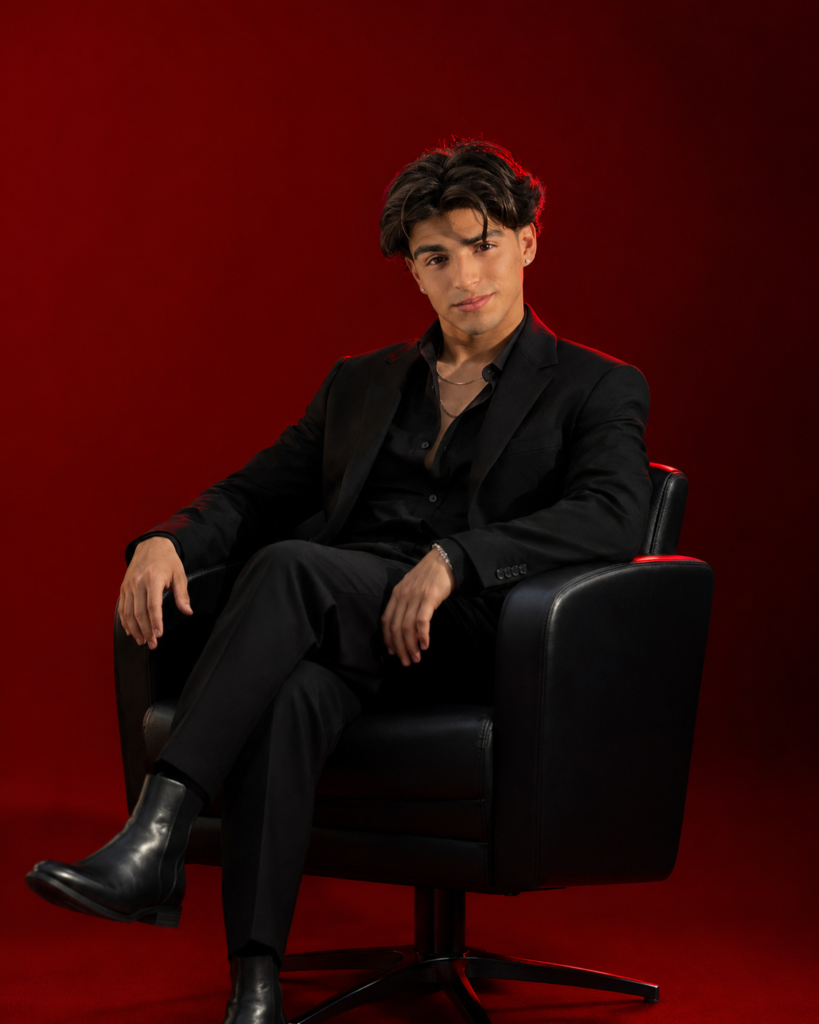
PROMPT 2 👇
A cinematic medium-full shot of the person
 seated confidently in a modern black leather
chair, captured from a slightly low angle.
Preserve the exact original face, identity,
facial features, face shape, eyes, nose, lips,
jawline, skin tone, hairstyle, and natural
facial details from the uploaded reference.
 Do not change, replace, or beautify the face.
 No face swap or AI-generated facial alterations.
He wears a sleek black suit with a black shirt.
 A solid deep-red background, dramatic directional
studio lighting, subtle red rim light, rule-of-thirds
 composition, clean negative space, 85mm prime lens,
shallow depth of field, sharp focus, rich blacks,
deep reds, smooth realistic textures, high contrast,
ultra-detailed, photorealistic fashion-editorial look.
3. An AI app –
Since you need to generate the photo before making the video, you will need to use the prompt I provided earlier. You need to create a photo that matches the example shown, using that specific prompt. For this, you will need an AI app. Personally, the AI app I use most frequently for photo editing is ChatGPT AI. So, use ChatGPT AI along with the prompt to generate your photo. Below, I will explain exactly how you can create them.
3. CapCut Video Editor app –
Once the photos are ready, you will need the CapCut application for video editing. Install the app on your phone. CapCut is a top-tier video editing app that offers almost everything needed for video editing. I personally use CapCut to edit my own YouTube videos and Instagram Reels.
4. Background Music –
Friends, to create these types of videos, you will definitely need background music—specifically, the *shayari* (poetry). I have provided links below to several trending *shayari* videos; using the audio from these in your own videos significantly increases the chances of them going viral. This is because the *shayari* tracks featured in these links are currently trending on Instagram.
With just these few things, you can easily create videos like this.
How do you go about this video editing process?
First, to create the specific type of image shown in the featured image of this article, you need to generate that photo. To do this, start by copying the prompt I have provided above. Once copied, open the ChatGPT AI app on your phone—you can find it on the Play Store or Apple App Store. Next, select the original photo you want to transform. Upload this photo to ChatGPT and paste the prompt below it. Finally, hit send, and your new photo will be generated in moments. By following these simple steps, you can easily create this kind of image. Once generated, save the photo to your gallery.
To create a video using photos, first open the CapCut app on your phone and select the photo you want to use. Next, download your preferred Shayari videos using the links provided above and add them to your photo within CapCut. Once added, synchronize the photo perfectly with the music. Then, add the following three effects to your video: 1. Distorted Strip, 2. Retro Flicker, and 3. Shake. Adjust these effects properly across the entire video. That’s it—your video is ready, and you can save it to your gallery. By following these simple steps, you can easily create your video.
Overall –
In this article, I have explained how you can easily edit trending “attitude Shayari” videos. These types of videos are currently going viral on Instagram; everyone—from amateur enthusiasts to famous cricketers—is creating and uploading them to their accounts. They are garnering significant views, likes, comments, and shares, which in turn boosts their profile reach and follower count. Creating these videos is very simple; I have provided a detailed, step-by-step guide in this article, covering everything from the initial photos to the final video creation. If you do not fully grasp the process after reading this once, I suggest reading it again; I am confident that will resolve any issues. If you are looking for a trending video editing topic, this “attitude Shayari” style is an excellent choice. That’s all for today’s article—see you in the next one!
9637670944
I’m potop copy and send
Nejsnsnana
Hvcvbb
झारखण्ड