
Mirror Selfie Ai Photo Background Prompt-Many people love taking mirror selfies. There is something special about capturing your Outfit, Style, and Pose while standing in front of a mirror. However, finding a beautiful mirror or the perfect background is not always easy. That’s why I have brought you this photo editing tutorial to solve that problem. Nowadays, Mirror Selfie Photo Editing using ChatGPT AI is becoming increasingly popular. With the help of ChatGPT, you can transform an ordinary photo into a beautiful Mirror Selfie Portrait. The best part is that you don’t need any separate editing application or Photoshop to create this type of photo. You can also create this style using your favourite Mirror Selfie Background. Simply download the viral Mirror Background, upload your own photo, and use the correct ChatGPT Prompt. The AI will generate a new Mirror Selfie Photo for you. In this article, I’ll show you how to create your own Mirror Selfie AI Photo easily using your personal photo.
Mirror Selfie Ai Photo Background Prompt
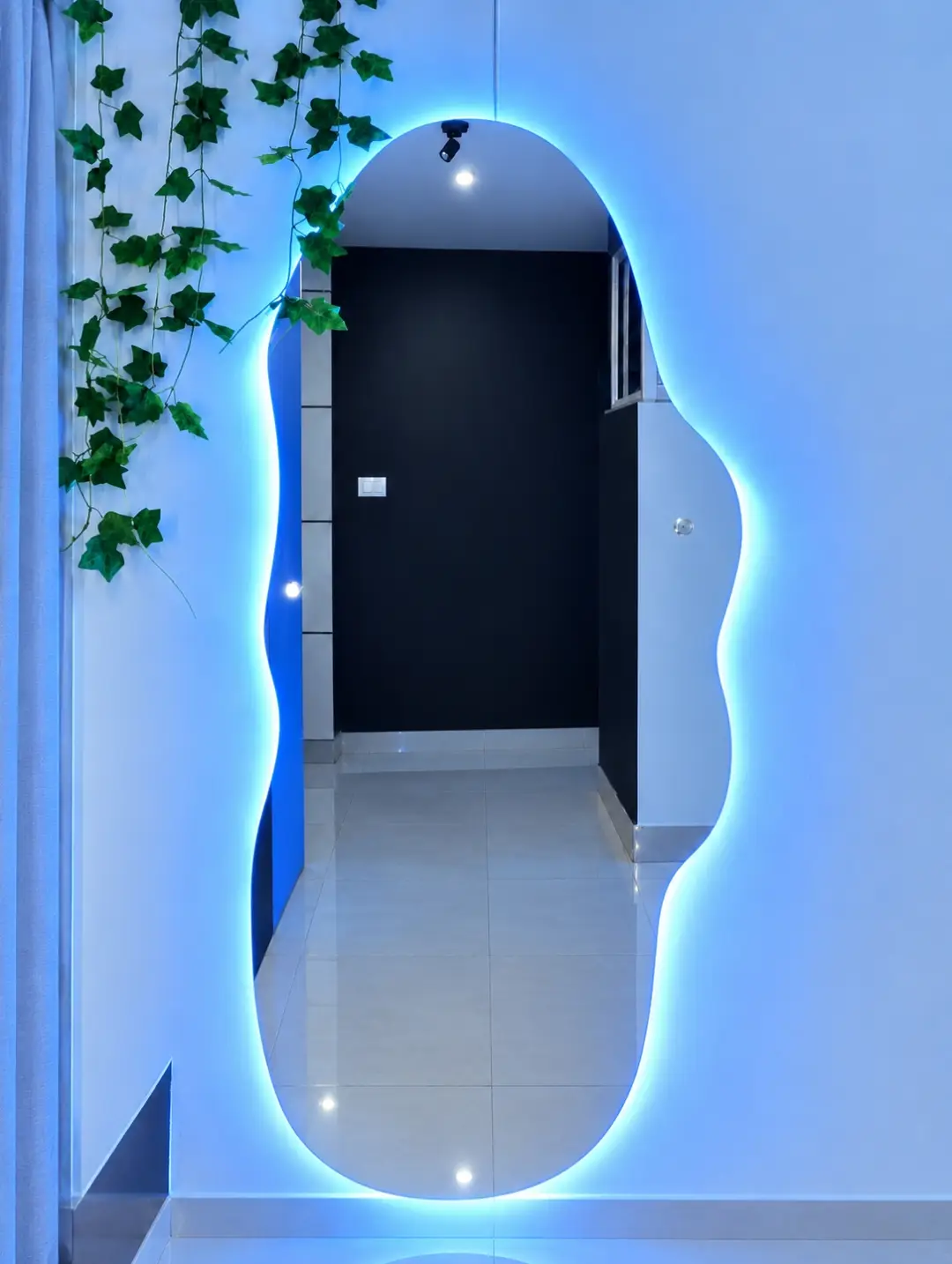
The most attractive feature of this photo is its unique mirror design. Unlike ordinary rectangular mirrors, this one has a beautiful wavy shape. Blue LED lights surround the mirror, creating a stunning glow effect throughout the setup. The walls are painted in a soft blue color, with green hanging vines decorating one corner at the top. Inside the mirror, you can see a dark wall and a shiny tiled floor. Overall, this design creates a modern and stylish mirror selfie photography setup. You can use this type of photo for your Instagram DP, Facebook profile picture, and WhatsApp status. If you want to learn more about creating this photo, simply follow the steps provided in this article.
What Need To Create Mirror Selfie Ai Photo?
You will need four things to create this Mirror Selfie AI Photo. Let’s take a look at what you need
- Mirror Selfie Background: First, download the Blue LED Mirror Background provided in this article. You can find it below. Simply click the download option to save it to your device.
- Your Own Photo: Choose a photo that you want to use for your new AI image. For better results, use a clear full-body photo. Take a mirror selfie using your phone, making sure your entire body is visible.
- AI Photo Editing Prompt: You need the correct prompt to combine your photo with the downloaded background. I’ve provided a short prompt below. Simply copy it and use it during editing.
- ChatGPT App: Everything is ready, but you still need an AI tool to generate your photo. For this tutorial, we’ll use ChatGPT AI, an AI image generation tool. Download the ChatGPT app from the Play Store.
Put the Real image ang use mirror
backgroud. Place this person in
the second photo in a realistic
manner and adjust them to match
the second photo; do not change
anything else. Keep the background exactly as it is-do not alter
it at all-and do not change the face
100% real same to same. Enhance the
image to 8K quality and set the aspect
ratio to 3:4.
How To Use Mirror Selfie Ai Photo Background Using Chat Gpt?
First, download the Blue LED Mirror Background image and save it to your phone’s Gallery. Now, open the ChatGPT app. You can download it from the Play Store, or you can also access ChatGPT through Google. Next, click on the Plus (+) option and upload your original photo along with the downloaded background image. After uploading both images, copy the AI prompt provided below and paste it into the chat. Once everything is ready, click the Generate button and wait for a few moments. ChatGPT will generate your own Mirror Selfie AI Photo. That’s it! By following these simple steps, you can easily create your own stunning Mirror Selfie AI Photo.
Conclusion
We often take photos in front of mirrors whenever we find a nice one. But if you use this background, your mirror selfie can look even more beautiful and stylish. The best part is that you don’t need to go anywhere or find a special mirror. You can simply stay at home and create this amazing photo using ChatGPT and the tutorial provided in this article. If you scroll through Instagram, you will notice that these types of mirror selfie photos are becoming very popular. So, don’t miss out on this trend! Create your own photo and share it on social media before the trend fades away. Now, download the background, copy the prompt, and create your own stylish AI Photo. If you face any problems while creating your photo, feel free to leave a comment. I’ll be happy to help you!
