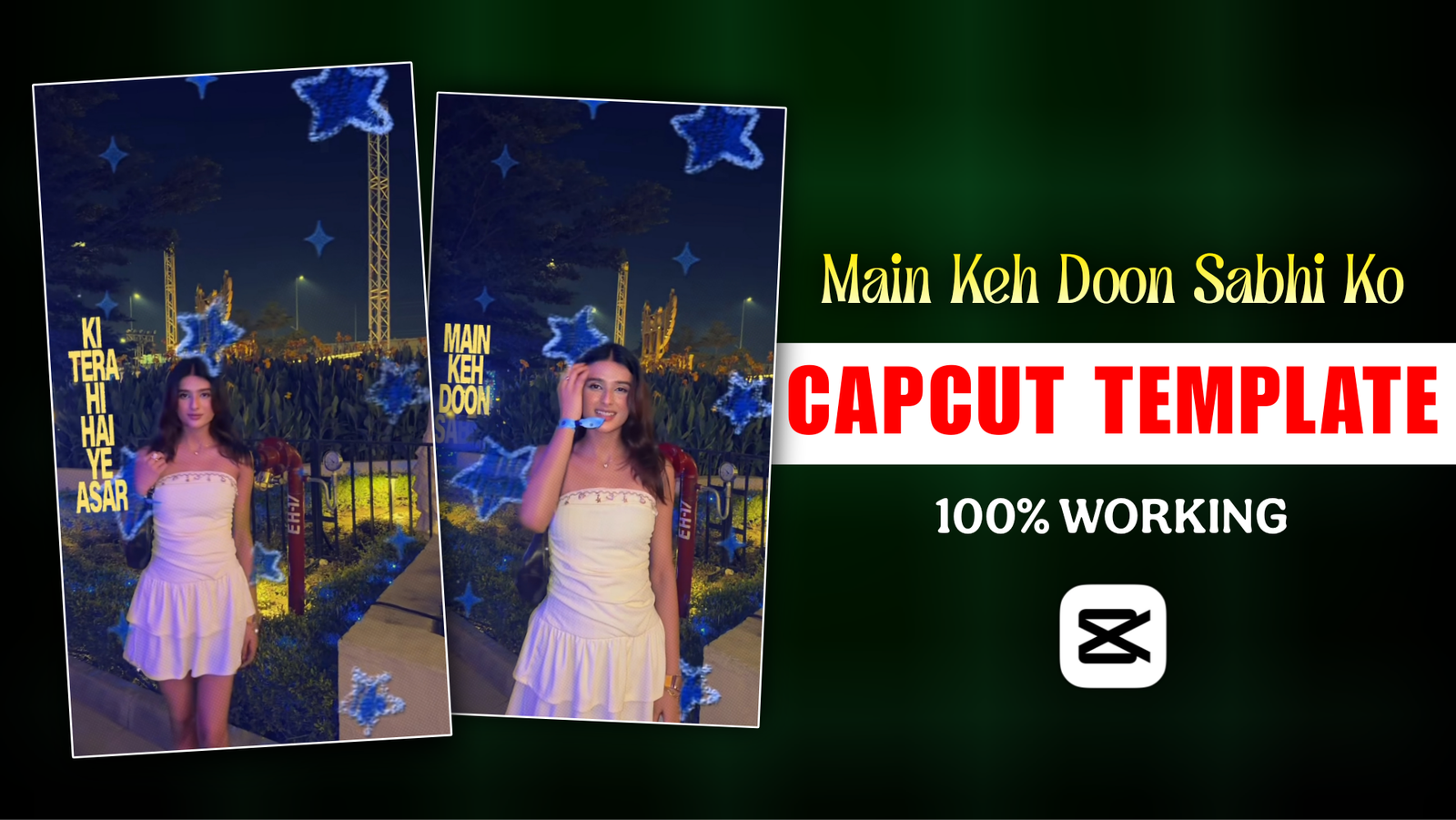
Main Keh Doon Sabhi Ko Capcut Template-Lately, if you open Instagram, you’ll likely come across a specific type of Reel featuring a video enhanced with a “star effect” and song lyrics, all set to the track “Main Keh Doon Sabhi Ko.” People—both singles and couples—are creating videos in this style. While such videos often go viral on Instagram, they don’t actually require much effort to produce. Once the original editing concept emerges, CapCut template creators quickly turn it into a template that any Instagram user can utilize. After all, no one wants to waste time on complex editing; people are always looking for ways to create viral content quickly. I am sharing the original link to the “Main Keh Doon Sabhi Ko” CapCut template so you can create this viral video without wasting any time.
Main Keh Doon Sabhi Ko Capcut Template
I posted a video clip set to the song “Main Keh Doon Sabhi Ko” on my Instagram page, and it garnered 1.2 million views. Upon checking the comments today, I noticed that everyone is asking for the template link. So, I decided to write an article for my Instagram followers where they can easily access the link. Knowing what the template includes and which effects were used will give you a better understanding of the video. For the best visibility of the lyrics, it is ideal to use a video clip shot at night. The most popular effect used here is the “Copy & Paste Star Effect”; you can find it by searching for this name in the CapCut effects section. The lyrics appear in yellow, and a “fade-out” text animation has been applied. While you can certainly create this video using the template, you also have the option to edit it step-by-step using the CapCut video editing app—though editing manually will take more time than using the template.
Mistakes Everyone Makes When Use Template For The First Time
If you’re new to CapCut templates, one common mistake is adding your videos or photos without checking how they fit with the template. You may add a few random clips and export the video, only to find out that the clips don’t match the music properly. So, what’s the mistake?When you add a video clip to a CapCut template, don’t forget to use the Trim option. Trim the clip properly so that the important part of your video matches the music or lyrics. This small adjustment can make a big difference in how your final video looks. Before exporting, take a quick look at the settings as well. Choose a good resolution and frame rate so you can export the video in high quality.
Where and how can you get the Main Keh Doon Sabhi Ko template?
Many of us find it difficult to locate specific song templates. Don’t worry; I’m going to share three methods that will ensure you never face this problem again.
- Search Directly in CapCut
If you want to use templates for the song “Main Keh Doon Sabhi Ko,” first download the CapCut app from the Play Store or App Store. Once downloaded, open the app and tap on the “Template” tab at the bottom. Here, you will find all the trending templates. If you can’t find the specific one you’re looking for, use the search bar and type “Main Keh Doon Sabhi Ko template”; a variety of templates will appear. Open them to see which one matches your video clip best. Select the one that fits, then tap the “Use Template” button to start using it.
- Find Templates Through Instagram
Many users struggle to find the template option within the CapCut app. What can they do? When you are watching Reels on Instagram—for instance, a video featuring “Main Keh Doon Sabhi Ko”—check the comment section. Often, creators ask viewers to follow them and comment the word “template,” after which they send the link directly to your inbox. You can try this trick if you are having trouble finding the template in the CapCut app.
- Get the Template From This Article
If you haven’t been able to find the template anywhere else, simply scroll down a bit on this article page. You will find the template right here. There is no need to search on CapCut or Instagram to find it.
How to create a video using the “Main Keh Doon Sabhi Ko Template ?
Now I’ll show you how to use the template. I’ll explain everything in the easiest way possible.
First, you need to click on the CapCut template link. In this post, you will see a blue-colored button. That is the template link, so simply click on it. After clicking the link, a new page will open. There, you will find a “Use Template” button. Tap on it and select the video clips or photos you want to use from your gallery. Once you have added your photos or video clips, look at the bottom of the screen. You will see a “Next” button. Tap on it. That’s it! Your video will be edited automatically using the template. To download your edited video, simply click on the “Export” button. Your video will then be saved to your device.

What should you do if the template doesn’t work?
Almost everyone faces this issue. Suppose you like a video and want to create one using its template, but the template won’t open. If you are facing the same problem, there is no need to worry; I will explain exactly how to resolve this template-opening issue in a very simple way.
First, try closing the app and reopening it to see if it works. If that doesn’t help, try switching your internet connection, as your internet speed might be too slow. If this trick doesn’t work, you can try another method. The issue might stem from the specific version of the app you are using; try downloading the latest version from the Play Store. I can say with 90% certainty that this will solve the problem.
One important thing to remember: this problem often occurs if you download the app from Chrome, whereas downloading it from the Play Store usually prevents the template-opening issue.
Overall
I hope you have clearly understood how to use the “Main Keh Doon Sabhi Ko” template. You can try creating the video yourself by following the editing steps I’ve outlined to see if it turns out exactly the same way. I hope the editing tips and tricks I’ve shared will help you edit your video successfully. If you encounter any issues while using the template, please let me know in the comment box.
2 thoughts on “Main Keh Doon Sabhi Ko Capcut Template”