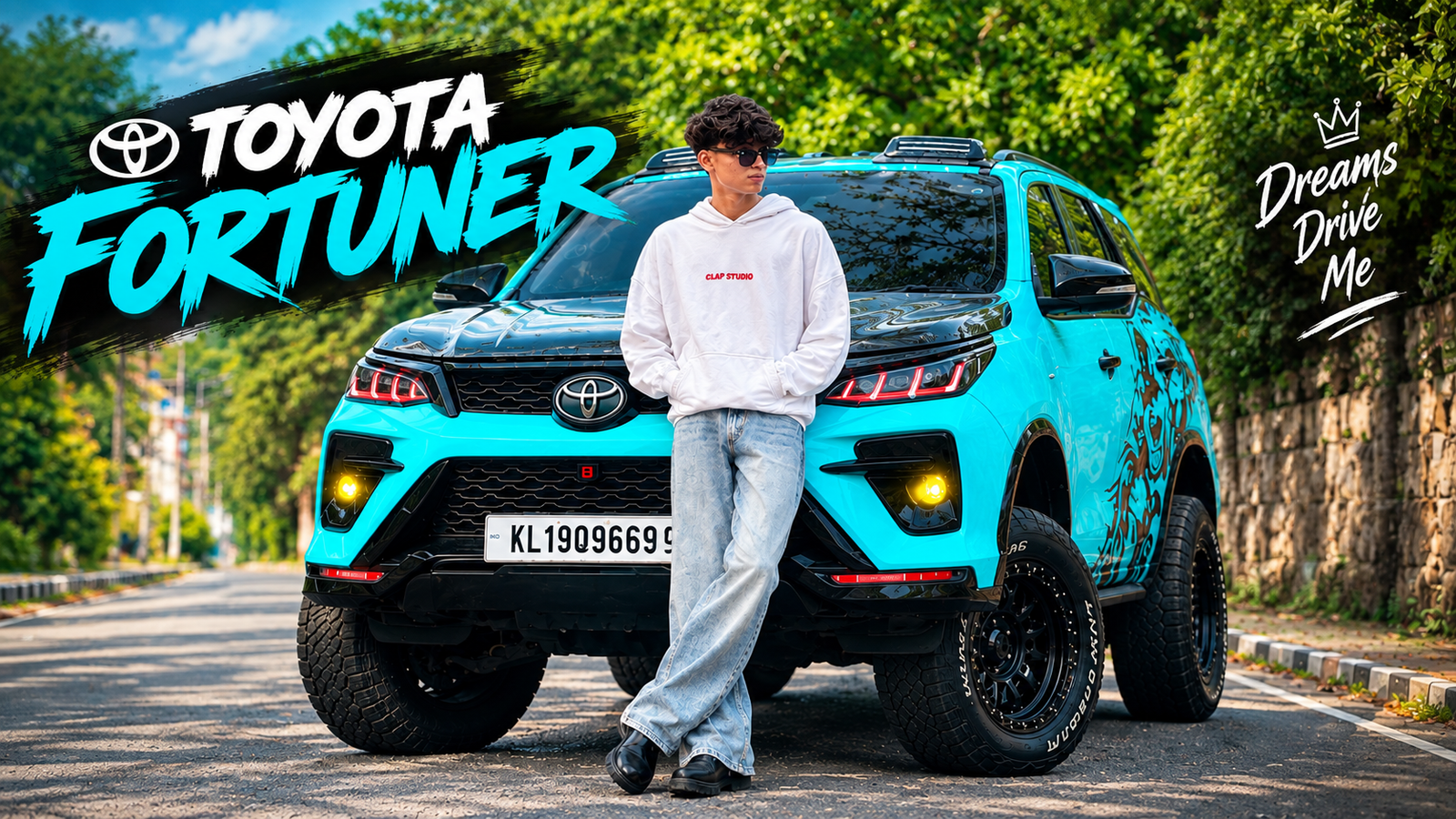
Toyota Fortuner Ai Photo Editig-The Toyota Fortuner is a car that many people dream of being photographed with, but it doesn’t always fit everyone’s budget. Besides, posing in front of someone else’s Fortuner just doesn’t give you that same feeling of ownership. But there’s no need to worry. Now, with the help of AI, you can create a realistic photo of yourself with a Toyota Fortuner. This AI photo editing trick will be especially useful if you enjoy posting travel or stylish photos on Instagram or Facebook. In this article, I’ll show you a simple way to create a realistic AI photo featuring a Toyota Fortuner using your own picture. You just need to follow a few easy steps. In the photo of the Toyota Fortuner I created, the car is black and blue. However, you might not prefer this color. If you wish, you can easily change the car’s color to one you like. To do this, simply write the following in the prompt: “Change the black & blue car color to [your favorite color].” The AI tool will then change the car’s color accordingly—for instance, to white, red, silver, or any other color of your choice. Are you not happy with the location either, not just the car color? In that case, you can change the car’s location as well. If you want to see the car in front of a beach, on a city road, or in any other beautiful setting, simply include that location in the prompt, and the AI will generate the photo accordingly. I also published an article yesterday on AI photo editing using an urban street background. Feel free to check that out as well.
About Toyota Fortuner Ai Photo Editing
This post will be incredibly helpful for car enthusiasts, as I am offering you the chance to get a photo with your dream car. While it isn’t a real photograph, I will generate an image that looks completely authentic. You can create such photos not just with the Toyota Fortuner, but with any car you like. Can you picture how the final image with the Toyota Fortuner will look? Imagine the blue-and-black car parked on the road with you standing right in front of it. The AI will generate the image based on the reference photo you provide. If you have ever used AI to generate photos, you might have noticed issues where your face or body didn’t quite match up; to avoid this, you need to use the right prompts, or else your features and physique might change. So, are you ready to try out this Toyota Fortuner AI photo editing?
What Need To Create Toyota Fortuner Ai Photo?
- Best AI Photo Generation Tools
There are many tools available today for creating AI photos. Among them, ChatGPT, Google Gemini, Leonardo AI, and Adobe Firefly are quite popular. However, not all of them function in the same way.
If you want to change the background of your photo, alter your outfit, or create highly realistic and cinematic images, you can use ChatGPT or Google Gemini. Many people are currently using ChatGPT to create AI photos for platforms like Instagram and Facebook. On the other hand, if your primary goal is graphic design or creating creative artwork, you might want to try Leonardo AI or Adobe Firefly. However, our goal today isn’t graphic design. We are going to create a realistic photo featuring you alongside a Toyota Fortuner. I’ll be using ChatGPT for this task because, with the right prompt, it delivers very realistic results.
- Your Photo
To create an AI photo with a Toyota Fortuner, you’ll need a good photo of yourself first. This photo will serve as a reference for the AI. Striking a stylish pose when taking the photo will enhance the final result. For instance, you could keep one hand in your pocket while holding sunglasses in the other. Pairing a white shirt with black trousers creates a clean, premium look that complements the Toyota Fortuner.
Toyota Fortuner AI Photo Prompt
Simply having access to an AI tool isn’t enough to create the photo you want; the prompt is what really matters. The more clearly you describe the type of image you desire to the AI, the better the chances of getting a great result. That’s why I’ve created a ready-to-use prompt for the Toyota Fortuner image. You won’t have to go through the hassle of crafting a prompt yourself—simply copy the one below and use it in ChatGPT. To get the prompt, just scroll down and read the rest of the article.
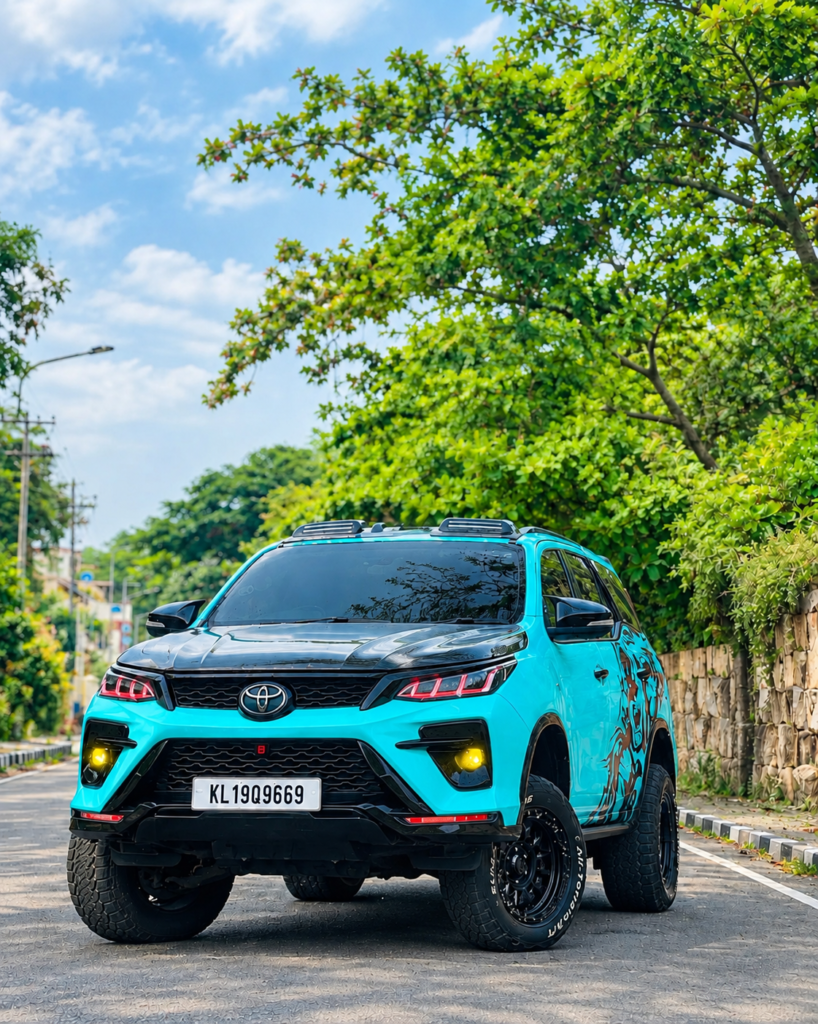
Use my uploaded photo as the identity reference.
 Create a photorealistic full-body image of me
 standing naturally in front of the same modified
 turquoise Toyota Fortuner. Preserve my exact
face, hairstyle, skin tone, clothing, and body
 proportions. Match the reference camera angle,
 composition, lighting, road, trees, and car
 details. Keep realistic shadows, reflections,
natural posture, sharp DSLR quality, and
cinematic colors.
How To Genret Toyota Fortuner Ai Photo Using Chat Gpt Ai Tools?
To generate this Toyota Fortuner AI photo, you need to upload a high-quality image where your full body and face are clearly visible in HD. I have provided a prompt below that you can use with an AI editing tool like ChatGPT. The prompt includes instructions on how to incorporate the image while ensuring your face and body remain unchanged. We will use ChatGPT to generate the photo. First, download the Toyota Fortuner background image I have provided. Then, upload both the background image and your personal photo to the ChatGPT app and enter the prompt I provided into the input box. Before tapping the generate button, double-check that the prompt and photos are correct. It will take about one or two minutes for the photo to generate. Once generated, click on the image and use the download button to save it. If you wish to make further changes—such as altering the car’s color—simply type a command like “Change the car color” (or specify whatever change you desire) to generate your preferred Toyota AI photo.
Overall
Don’t like the Fortuner? Do you prefer a different car? Let me share a method that allows you to generate photos with *any* car, not just the Fortuner. First, you need to download a photo of your preferred car; you can easily find plenty of images on Google or Instagram by simply searching for the car’s name. Then, use the prompt I’ve provided with an AI tool like ChatGPT to generate the image. If you use my prompt to create a photo with a Fortuner, please leave a comment letting me know how it turned out. Also, share the photo with your friends and surprise them by showing them how you created it.